
For most of my life, my technology world was remarkably consistent. If it wasn't running on Microsoft software and Intel hardware, I probably wasn't interested.
That wasn't out of stubbornness. It was simply where my personal and professional interests lived.
I grew up during the home computer revolution of the 1980s, starting with a Commodore VIC-20 before graduating to the legendary Commodore 64. Those machines sparked a fascination with computing that would eventually become a career.
After the Commodore era, I moved straight into the IBM-compatible world with a 286 system. Interestingly, many of my friends went in a completely different direction, adopting Apple IIe computers while I immersed myself in DOS, Microsoft software, and the rapidly growing PC ecosystem.
Looking back, that decision largely defined the next several decades of my computing life.
My Technology Journey
- Commodore VIC-20My starting point in home computing
- Commodore 64The machine that deepened my interest
- 286 PCMy move into the IBM-compatible world
- Windows and IntelDecades of personal and professional focus
- Windows PhoneSeveral generations, including the Lumia 1020
- Mac mini M1An intentional expansion of the lab
- iPad 9th GenManagement testing and practical workspace use
- AndroidMy current daily mobile platform
Decades of Microsoft and Intel
As Windows matured and the enterprise technology landscape evolved, my focus became even more concentrated.
Professionally, I built my career around Microsoft technologies. Personally, my home labs, desktops, servers, and notebooks all followed the same pattern:
- Intel processors
- Windows operating systems
- Microsoft productivity tools
- Microsoft infrastructure technologies
For decades, I never felt a strong reason to look elsewhere.
That isn't a criticism of Apple. Quite the opposite.
I simply already had a deep investment in understanding one ecosystem and continually expanding within it.
Eventually, however, curiosity got the better of me.
The M1 Processor Changed My Perspective
When Apple announced the first generation of systems powered by the M1 processor, I became intrigued.
The discussion wasn't centered on user interface preferences or operating systems.
It was about architecture.
For years, Apple and Microsoft devices had largely competed on similar Intel platforms. Suddenly Apple was introducing something fundamentally different.
I wanted to answer a simple question:
How good is this technology when used as a daily desktop computer?
At the same time, my consulting responsibilities were beginning to expand. Supporting modern endpoint management increasingly meant understanding environments beyond Windows.
I realized that if I wanted to provide informed guidance to clients and organizations, I needed firsthand experience in other ecosystems.
So I decided it was time to broaden my lab.
Enter the Mac mini M1
When the Mac mini M1 launched, I picked one up with:
- 16 GB RAM
- 256 GB SSD
- Apple's new M1 processor
The system immediately impressed me.
The performance-per-watt ratio was unlike anything I had previously used on the desktop. Even years later, the machine remains remarkably responsive for its size and power consumption.
My original intention was to experiment heavily with virtualization.
Naturally, I installed Parallels and spent some time exploring Windows virtual machines on Apple Silicon. While it worked surprisingly well, I eventually realized something:
I already had multiple Windows systems throughout my home lab.
The virtualization capability was interesting, but it wasn't solving a problem I actually had.
Instead, the Mac found a different role.
Learning Apple Management Through Intune
The Mac mini became an excellent platform for validating Apple device management scenarios.
As Microsoft Intune continued expanding its support for macOS, having a physical Apple device available proved invaluable.
Rather than reading documentation alone, I could:
- Test enrollment processes
- Validate compliance policies
- Evaluate configuration profiles
- Understand the user experience
- Compare management approaches against Windows
As consultants, it is easy to become experts in theory.
Actually touching the technology often reveals nuances that documentation never captures.
The Mac mini became less of a curiosity project and more of a practical learning platform.
Adding an iPad to the Mix
Not long afterwards, I added an iPad 9th Generation to the environment.
Initially, this was partly driven by the same desire to understand and support another platform.
Over time, however, the device found some surprisingly practical roles.
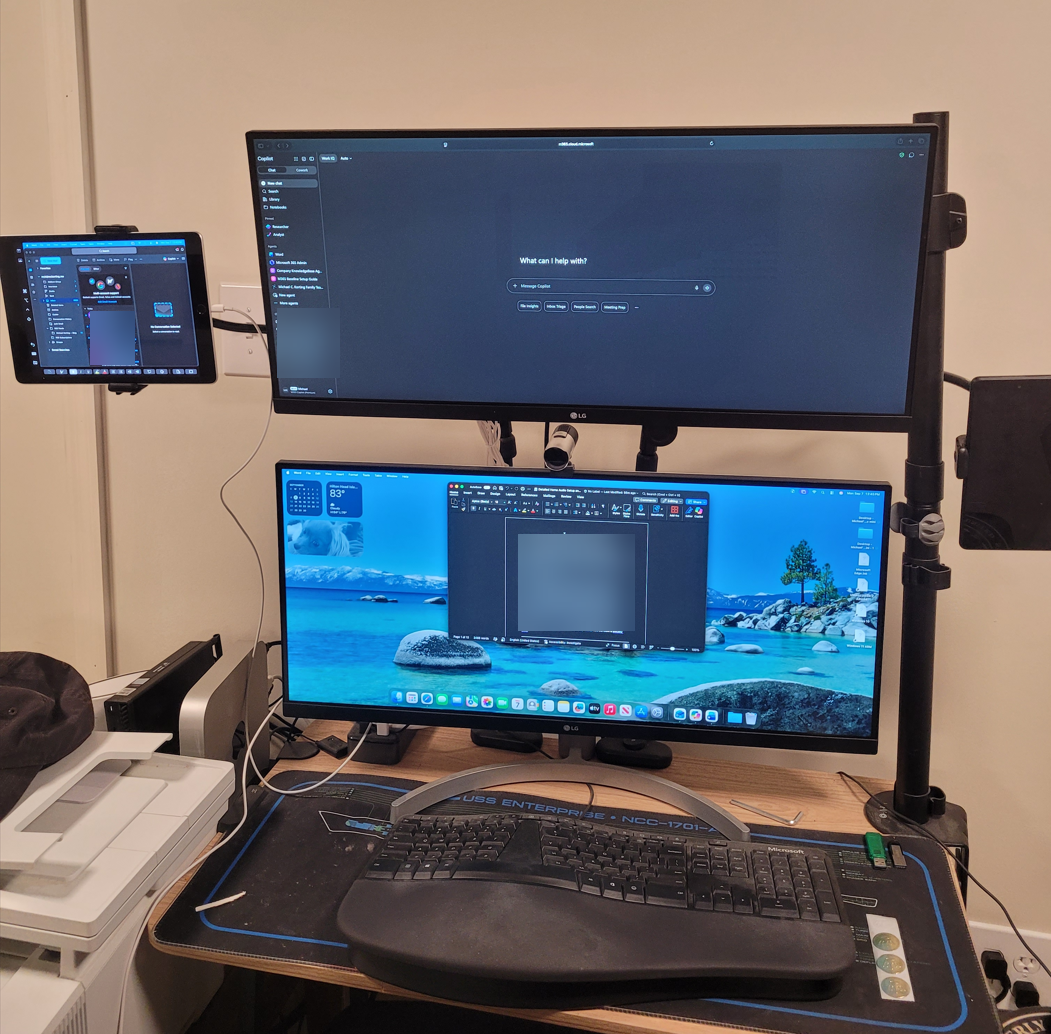
One of my favorites is using it as a dedicated side display.
Mounted beside my dual stacked 29-inch ultrawide monitors, the iPad serves as a convenient third screen for:
- Documentation
- Reference materials
- Teams chats
- Monitoring dashboards
- Quick web research
The setup works remarkably well and helps maximize desk space without adding yet another monitor.
For someone who spends substantial time documenting projects and creating technical content, the extra screen real estate is always welcome.
Unexpected Practical Uses
While the iPad started as a technology experiment, its day-to-day role evolved.
Today, it is frequently used for:
- Reading news
- Online shopping
- Capturing screenshots for technical documentation
- Casual browsing
In fact, my wife probably uses it more than I do these days.
That may be the ultimate sign that a technology purchase succeeded. It became so useful that it naturally integrated into everyday life.
The Mobile Exception
Despite adding Apple hardware to my environment, there is one place where I never made the transition.
My phone journey is a little more nuanced than simply choosing Android over Apple.
Before settling into Android, I used several generations of Windows Phone, including the iconic Lumia 1020. That device, with its memorable camera-first design, remains one of the most interesting phones I have owned.
In many ways, Windows Phone fit naturally into my Microsoft-centered technology world. It was clean, distinctive, and tied closely to the services I was already using.
But after Microsoft exited the mobile phone platform race, Android became the practical path forward.
Today, Android continues to meet my needs well, and I appreciate the flexibility it provides.
How the Devices Fit Today
| Device | Original Purpose | Current Purpose |
|---|---|---|
| Mac mini M1 | Evaluate Apple Silicon | Intune testing and validation |
| iPad 9th Gen | Learn iPadOS management | Third display, documentation, and news |
| Android phone | Post-Windows Phone daily mobile platform | Daily mobile device after several generations of Windows Phone, including the Lumia 1020 |
Why This Matters for Technology Professionals
One of the most valuable lessons from this experience has nothing to do with Macs, iPads, or processors.
It is about remaining open to learning.
Technology professionals often develop strong preferences based on years of experience. Those preferences are usually earned.
However, limiting ourselves to a single ecosystem can also limit our understanding.
The best consultants, architects, and engineers understand multiple approaches, multiple platforms, and multiple ways of solving problems.
Adding a Mac and an iPad did not change my Microsoft-focused career.
If anything, it strengthened it.
Understanding how different platforms operate has made me a better consultant, a better troubleshooter, and a better advisor to organizations with increasingly diverse environments.
Final Thoughts
From a VIC-20 and Commodore 64 in the 1980s to Microsoft-centric labs for most of my career, expanding into Apple hardware was never something I expected to do.
Yet the introduction of the M1 processor gave me a compelling reason to take a closer look.
Several years later, the Mac mini remains a useful platform for testing and learning, while the iPad has become an unexpectedly practical addition to my workspace.
And despite all of that?
There is still an Android phone in my pocket, with a Windows Phone chapter behind it.
Sometimes technology isn't about picking sides.
Sometimes it is about learning enough about every platform to understand where each one fits.